
You can integrate Zapier with your account on FindAMasters, allowing you to map any email enquiries your listings receive on our website, directly into your own preferred CRM platform (such as Salesforce or HubSpot).
To begin integration, simply follow the steps below.
Please note: to integrate Zapier with your account on FindAMasters, you must be a central user account type. If you need to find out what account you are, please contact your Account Manager.
You will also need to have one of our Core or International Packages live on FindAMasters.
Setting up Zapier to integrate with your account on FindAMasters
- Log into your account at admin.findauniversity.com
- Navigate to “Manage -> Zapier” section on the left-hand menu.
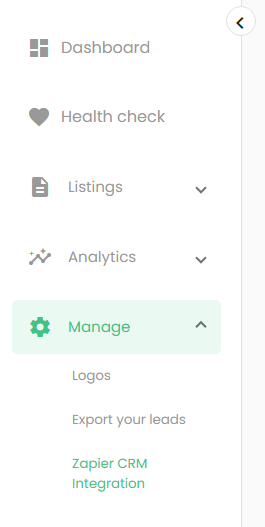
- Copy the Api Key text.
- Log into your account on zapier.com
- Select “Create -> Zap”.
- Click on the “Trigger” workflow element.
- Search “findamasters” and select our App that appears.
- For trigger event select “Enquiry Data Submitted”.
- Click in the “Account” box, and if this is the first time you are setting up an account then click “+ Connect a new account” (otherwise select an existing account and jump to step 13).
- In the Authentication popup box, paste in the API Key from step 3.
- Select the subscription type “Lead Capture”.
- Click the Continue button.
- Click the Continue button on the popup at the right side of the screen.
- Click the “Test Trigger” button*.
- Click “Continue” to use the test dataset.
- Search for your CRM platform to use in the Action part of the workflow (e.g. the place where you store/manage leads).
- After this has been set up then click the “Publish” button.
- The Zap is now active and any email enquiries for your institution on FindAMasters should also now send that data to Zapier, and your CRM platform.
*There might not be any test results to show immediately. If there are no results to show (e.g. “No enquiry found”) then just click the “Skip Test” button.
If you have any issues with integrating Zapier on FindAMasters, please get in touch with your Account Manager.